

How
UAE Schools Can Turn the AI Literacy Framework into a Practical KG–12 Program
For UAE schools, the AI Literacy
challenge is changing.
The question is no longer simply
whether students should learn about artificial intelligence. The UAE has
already established a clear direction toward a progressive K–12 approach
covering AI concepts, data and algorithms, ethics, societal impact and practical
application. The challenge for school leaders is now much more operational:
How do you turn that framework into
lessons, activities, experiments, assessments and measurable student
progression?
That requires more than introducing
ChatGPT, robotics or coding activities.
A structured AI Literacy program
needs to connect:
Framework → Curriculum → Teachers →
Interactive Learning → AI Experimentation → Assessment → Governance → Evidence
of Progression
This is where an AI-native learning
environment such as Mexty
can help schools move from framework to classroom implementation.
The UAE approach itself emphasizes
progression rather than isolated technology experiences. Students should move
from foundational awareness toward understanding, evaluation, design and
responsible application, while human oversight, ethical use and cultural
relevance remain important throughout the journey. How to Implement the UAE AI Lit…
Step
1: Start with learning outcomes, not AI tools
A common mistake is to begin an AI Literacy project by asking: Which AI tools should we give students?
A better starting point is:What
should students understand and be able to do at each stage?
For example:
A Grade 4 learner might need to
understand how data, rules and patterns influence an AI system.
A Grade 8 learner might need to
identify misinformation, bias or an unreliable AI output.
A Grade 12 learner might need to
evaluate an AI-enabled solution from technical, ethical and governance
perspectives.
This creates a progression rather
than a collection of unrelated activities.
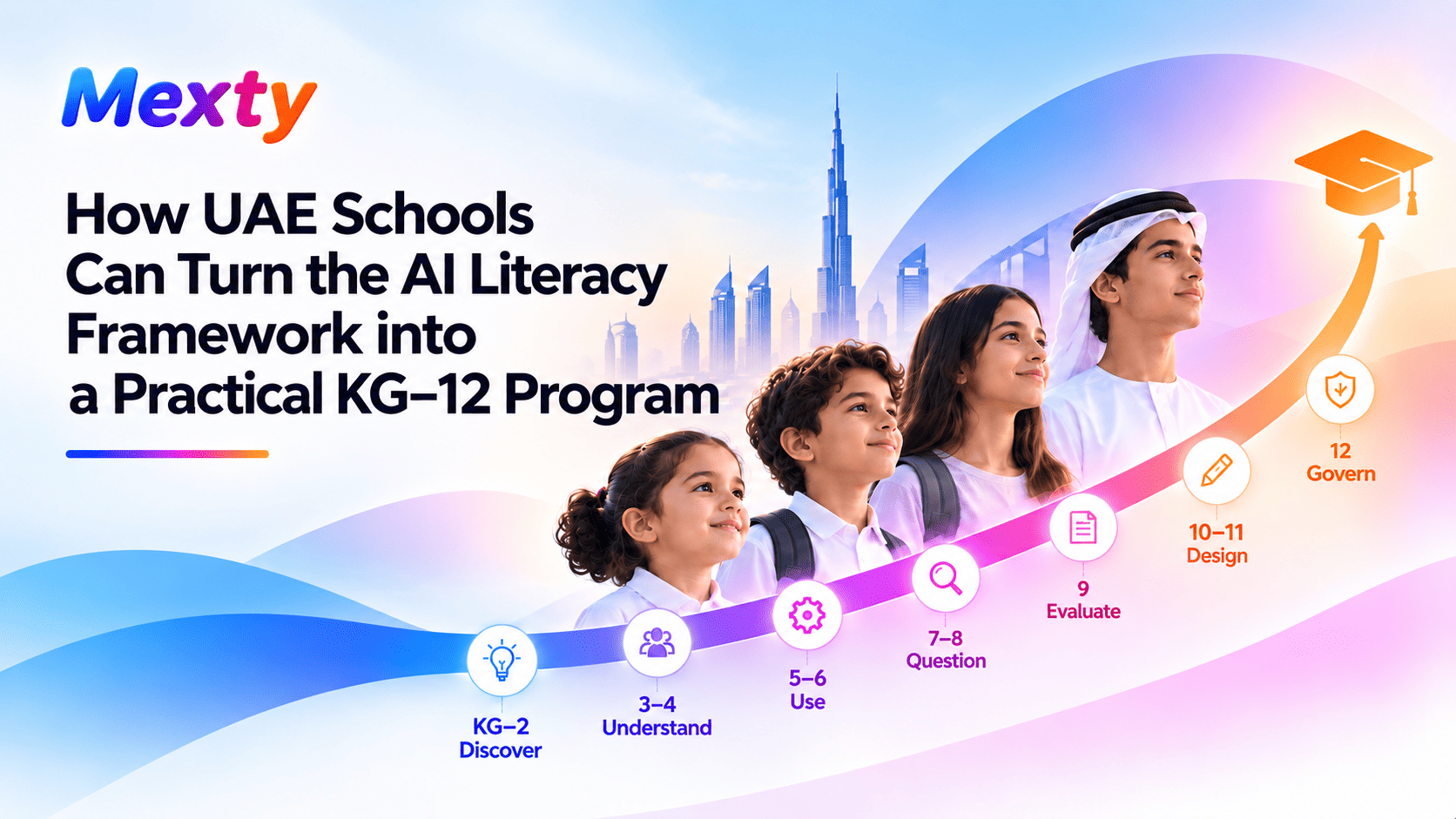
A practical KG–12 journey can be organized
broadly as:
KG–Grade 2: Discover AI
Smart tools,
instructions, patterns, humans and machines, safe technology use.
Grades 3–4: Understand AI
Data, rules,
prediction, privacy and human oversight.
Grades 5–6: Understand how AI
learns
Training data,
classification, algorithms, accuracy and bias.
Grades 7–8: Question and evaluate AI
Generative AI,
misinformation, fairness, deepfakes, privacy and reliability.
Grade 9: Use and challenge LLMs
Prompting,
context, hallucinations, source verification, bias and academic integrity.
Grades 10–11: Compare and design AI
systems
Model
comparison, human-AI collaboration, explainability and accountability.
Grade 12: Design and govern AI
responsibly
Governance,
regulation, societal impact and responsible AI-enabled solution design.
The overall learning journey
becomes:
Discover → Understand → Use →
Question → Evaluate → Design → Govern
How to do this in Mexty
Instead of building every grade
from scratch, a school can start from a Mexty AI Literacy curriculum template
and adapt it.
I would create an internal page
here:
The template should give teachers a
ready-made starting structure by grade, but everything should remain editable.
A school could, for example, open
the Grade 7 UAE AI Literacy template and:
- edit existing content or add its own,
including text, images, videos, and other resources;
- adapt the
sequencing to fit the school timetable or curriculum structure;
- replace
or enrich examples with cases relevant to the school community;
- adjust
the difficulty or depth of courses and selected activities;
- add the
school’s own digital citizenship or AI-use policies;
- add or
modify interactive activities and AI Literacy Lab exercises;
- customize
the final assessment to reflect the school’s own expectations and
evaluation approach..
The important principle is: Mexty
provides the starting framework. The school owns the final curriculum.
Step
2: Turn the curriculum into editable learning paths
Once the objectives are defined,
they need to become an actual learning journey.
This is where the distinction
between a curriculum document and a working learning environment becomes
important.
A curriculum may say: Students
should understand hallucinations and know how to verify AI-generated
information.
But a teacher still needs to turn
that into: Course → Explanation → Experiment → Practice → Assessment
Mexty Learning Paths can connect courses and evaluations
into structured programs, including sequencing and progression rules. Mexty's documentation describes Learning
Paths as multi-step programs that combine learning components rather than
leaving courses isolated. MEXTY.AI
A Grade 9 pathway might therefore
look like:
Module 1: How LLMs generate answers
↓
Activity: Prompt and context
experiment
↓
Module 2: Hallucinations and
verification
↓
AI Literacy Lab
↓
Assessment: Can you identify an
unreliable answer?
This is much closer to a real
competency journey than simply assigning a course about generative AI.
For an overview of Mexty's authoring, evaluations, learning
paths and analytics, schools can use the Mexty Getting
Started hub.
Step
3: Edit everything rather than accepting AI-generated content as final
AI can help schools accelerate
creation, but AI-generated content should never become automatically approved
curriculum.
Mexty therefore allows creators to refine content after
generation.
For interactive activities,
teachers can edit in three ways:
- Ask the
AI to change something
For example: “Make these questions appropriate for Grade 6” or “Add a scenario about misinformation.” - Edit the
properties manually
Teachers can change questions, titles, descriptions, labels, settings, scoring and other elements directly. - Edit the
underlying code when advanced control is required.
Mexty's Activity Editor also provides previewing across
devices and version history. MEXTY.AI
This is important for AI Literacy
because the teacher may want to change more than wording.
For example, an AI-generated bias
activity might initially use a generic recruitment scenario.
A UAE school might instead decide
to:
- replace
the scenario with an age-appropriate school context;
- simplify
the language;
- introduce
a culturally relevant example;
- add a
discussion prompt;
- change
the correct response;
- require
students to justify their decision.
That is the difference between AI-generated
learning and teacher-controlled AI-assisted learning.
Step 4: Add interactivity instead
of turning AI Literacy into another slide course
AI Literacy is particularly
unsuited to passive learning.
Students should not only read that
AI can hallucinate.
They should encounter an answer
that looks convincing, investigate it and discover the problem.
They should not only memorize the
definition of bias.
They should compare outputs and
identify where bias may appear.
Mexty allows teachers to reuse or build their own reusable
interactive activities including quizzes, games, decision scenarios and other
learning blocks. Activities can be created directly from a description and then
edited manually or with AI. MEXTY.AI
Imagine a Grade 8 lesson on
reliable AI information.
Instead of five explanatory slides,
the teacher could create:
Activity 1: Spot the problem
Students
inspect an AI answer and identify the statement that needs verification.
Activity 2: Reliable or unreliable?
Students
categorize sources.
Activity 3: What would you do?
A branching
scenario asks whether to accept an AI answer, verify it or seek human review.
Activity 4: Compare two models
Students
identify differences in evidence, confidence and missing perspectives.
That makes AI Literacy
experiential.
Teachers can start with Mexty's existing activity library and
adapt a block rather than creating every interaction from scratch. MEXTY.AI
Step 5: Use the AI Literacy Lab to
let students investigate AI behavior
One of the most important parts of AI Literacy is experimentation.
Students should be able to see for
themselves that:
- different
models may answer differently;
- changing
context changes an answer;
- a
confident response can still be wrong;
- source
quality matters;
- AI
outputs may reflect bias;
- human
judgment remains necessary.
This is the purpose of the Mexty
AI Literacy Lab.
A Lab activity might ask: “Is
social media beneficial for teenagers?”
Students first ask one model. Then
another.
Then they change the context:
“Answer as a psychologist.”
and: “Answer as a social media
company.”
Now the learning question is no
longer: What did the AI answer?
It becomes: Why are these answers
different?
Students can examine:
- assumptions;
- perspective;
- evidence;
- confidence;
- missing
information;
- possible
bias.
Another Lab could compare: General
AI answer versus answer grounded in teacher-approved sources.
This directly teaches one of the
central AI Literacy habits: verification.
Step
6: Ground activities in teacher-approved knowledge
Teachers should not have to rely
entirely on what a general AI model happens to know.
Mexty's Knowledge Bases allow schools to upload documents
and designate them either as guidance or as a Source of Truth. AI
interactions can then be grounded in those materials. MEXTY.AI
For an AI Literacy unit, a school
might build a Knowledge Base containing:
- curriculum
references;
- school AI
policy;
- digital
safety policy;
- teacher-validated
resources;
- UAE
guidance;
- age-appropriate
reference material.
The teacher can then use that
Knowledge Base when creating lessons or activities.
For example:
“Create a Grade 8 activity on AI misinformation and Mexty
source of the truth feature to make sure that AI will use only the documents in
this Knowledge Base.”
This is particularly useful for
teaching students the difference between:
model knowledge
and grounded knowledge.
Schools can learn how to configure
this through the Mexty
Knowledge Bases guide.
Step
7: Add the school's own content, policies and teaching materials
AI Literacy should not feel like an
external course imposed on the school.
The implementation should reflect
the school's own environment.
Teachers can therefore add:
- school
policies;
- existing
PowerPoints;
- PDFs;
- classroom
materials;
- worksheets;
- examples;
- videos;
- assessment
questions.
Mexty's Tools can transform static resources such as PDFs,
PowerPoints and documents into interactive content. The resulting activity
remains editable afterwards. MEXTY.AI
For example, a school may already
have a PDF called:
Responsible Use of Generative AI at
Our School
Rather than asking students to read
the PDF, the teacher can use it to create:
- interactive
slides;
- a quiz;
- a
checklist;
- flashcards;
- a
decision activity.
The teacher can then add that
activity to the relevant AI Literacy learning path.
Step
8: Build teacher readiness into the implementation
A school cannot scale AI Literacy
successfully if teachers themselves are uncomfortable with AI.
Teachers do not need to become
machine-learning specialists.
But they should be able to explain
and facilitate questions such as:
- Why does
AI hallucinate?
- How does
context affect an answer?
- What
information should students not share?
- What
makes a source trustworthy?
- How can
bias influence an AI system?
- When
should AI assistance be allowed?
- When
should human judgment override AI?
The UAE implementation approach
treats teacher development as part of implementation rather than something
added later.
In Mexty, teacher training can itself be delivered as a
Learning Path.
For example:
Teacher AI Literacy Foundation
→ AI
Fundamentals
→ Generative AI and LLMs
→ Hallucinations and verification
→ Privacy and student data
→ AI-assisted assessment
→ Classroom experimentation
→ Human oversight
Teachers can complete the same Labs
students will later experience, which helps them understand both the content
and the pedagogical objective.
Step
9: Assess capability, not just knowledge
AI Literacy cannot be measured only
through questions such as: What is a hallucination?
A learner may know the definition
and still fail to recognize one.
A stronger assessment might show an
AI-generated answer and ask: Which claim needs verification?
Or present a recommendation and
ask: Should this be accepted automatically, investigated further or reviewed by
a human?
Mexty's Evaluations module allows schools to combine
different assessment formats into one scored experience, including quizzes,
hotspots, branching decision scenarios, question banks, confidence checks and
categorization. MEXTY.AI
A Grade 8 assessment on trustworthy AI could combine:
1. Knowledge
A short
question about hallucinations.
2. Recognition
A hotspot
identifying an unsupported claim.
3. Judgment
A branching
scenario requiring a decision.
4. Categorization
“Reliable /
Needs verification / Unsafe.”
5. Confidence
“How confident
are you in your answer?”
This provides a richer picture of
AI Literacy than a conventional test.
See the Mexty
Evaluations tutorial.
Step
10: Treat governance as part of the learning experience
AI governance should not sit only
with the IT department. Students also need to understand why boundaries exist.
Schools should define:
- which AI tools students can access;
- which
models are appropriate for different ages;
- which
student information must not be shared;
- which
sources can be used;
- who
validates AI-generated learning;
- when
teachers must intervene;
- how
academic integrity is handled.
The UAE approach increasingly
connects AI Literacy with privacy, human oversight, content safety, cultural
alignment and fairness.
Mexty's role here is to provide a more controlled
environment than sending students independently to multiple public AI services.
Knowledge Bases can define approved
information. Roles and permissions can restrict what different users can do.
Activities can be designed and reviewed before learners use them. MEXTY.AI
The principle should remain simple:
AI supports the learning process. Teachers and schools remain responsible
for it.
Step
11: Pilot before scaling across KG–12
A school does not need to launch
all thirteen grade levels at once.
A more manageable approach is: Prepare
→ Pilot → Measure → Refine → Scale
For example, a school could begin
with:
Grade 4
Foundations,
data and patterns.
Grade 8
Generative AI, misinformation and bias.
Grade 11
Model
comparison, accountability and governance.
This gives the school three
different age groups and allows it to test:
- curriculum
fit;
- teacher
readiness;
- student
engagement;
- technology;
- assessment;
- governance.
After one term, the school can
review the evidence and refine the templates before extending the program.
A
practical example: building a Grade 8 AI Literacy unit in Mexty
Here is what the workflow could
look like for a school using the ready-made Grade 8 UAE AI Literacy template.
Objective:
Students should
be able to identify an unreliable AI answer and choose an appropriate
verification strategy.
1. Open the Grade 8 UAE AI Literacy
learning path.
The learning path already includes
the relevant courses, interactive activities and assessment components, so the
teacher does not need to build the unit from scratch.
2. Review and adapt the existing
content.
Teachers can edit the course text,
examples, images, videos and explanations to reflect the school’s own context,
terminology and teaching approach.
They can also add the school’s own AI-use policy, digital citizenship guidance or classroom expectations.
3. Add trusted school resources.
Upload approved documents, policies
or reference material to a Knowledge Base and use them as trusted sources for
selected learning activities.
This allows the school to connect
the existing Mexty
content with its own validated resources.
4. Adjust the interactive
activities where needed.
The learning path already includes
activities, but teachers can modify them, change examples, adjust difficulty,
or add additional interactions.
For example, the teacher might
enrich an existing hallucination activity with a school-specific scenario or
add another source-verification exercise.
5. Use the AI Literacy Lab for
practical experimentation.
Students can compare responses from
different AI models, change the prompt or context, investigate hallucinations
and explore how grounding an answer in trusted sources affects the result.
This moves the lesson from
explanation to direct experimentation.
6. Customize the assessment.
The Grade 8 template already
contains assessment components. Teachers can review and adapt the questions,
scenarios, categorization tasks, hotspots or confidence checks to reflect the
school’s own objectives and level of difficulty.
7. Deliver the learning path.
Students progress through the
predefined sequence of courses, activities, AI Literacy Lab exercises and
evaluation within one structured journey.
8. Review learner evidence and
refine.
Teachers can examine student
performance, identify areas where learners struggled and decide whether to
reinforce a concept, adjust an activity or add additional practice.
The key advantage is that the
school starts with a complete UAE Grade 8 AI Literacy learning path,
rather than an empty template.
Mexty provides the structure, courses, activities and
assessment foundation. The school can then edit, enrich and adapt the
experience while keeping full pedagogical control.
From
framework to classroom reality
The strategic direction is
increasingly clear across the UAE: AI Literacy needs to become a progressive
capability rather than a collection of isolated technology activities.
The more difficult question is
implementation.
Schools need to connect:
Curriculum → Teachers → Content →
Experiments → Assessment → Governance → Evidence
Mexty is designed to provide that connective layer.
It does not replace the UAE
framework. It does not replace teachers and it should not determine pedagogy.
Instead, it gives schools a
starting curriculum, editable templates, interactive authoring, AI Literacy
Labs, trusted knowledge, assessments, learning paths and analytics within one
environment.
The ultimate measure of success is
not how many AI tools a school introduces. It is whether students progressively
learn to understand AI, use it, question it, evaluate it and make
responsible decisions about it.
Ready to explore the program?
If you enjoyed this, you’ll love our next articlesHow UAE Schools Can Build a Progressive AI Literacy Journey from KG to Grade 12 |